Shader Jam
Join Shader Jam
The Jam is planned the Sunday 5 April @ 20:00 (German Time)
Bonzomatic
The Shader Royale Jam will be using the latest networked version of Bonzomatic. You can download the program here:
- https://github.com/wrightwriter/Bonzomatic-Compute/releases/tag/v1.0.1 - Get this one by default
- https://github.com/TheNuSan/Bonzomatic/releases/tag/v13 - You can still use this version without compute shader if you want
You just need to unzip the file somewhere on your computer.
MacOS and Linux users: There is unfortunately no official build, so you will have to build from source. Be sure to also fetch the font and textures from the Windows build and place them in the right directory. Also, there is no stability guarantee on theses platforms, small differences in the shader compilers between the platforms sometimes cause issues.
If you are using a laptop, make sure to go to your Nvidia panel to make sure Bonzomatic.exe can use the High Performance GPU profile (or equivalent)
Extra Texture Installation
A package with extra textures will be available for the jam. Download zip file revision_2026_texture_pack_dritterlogo.zip and unzip to a directory.
Copy the content of the textures directory and paste everything inside your Bonzomatic textures directory. Your Bonzomatic directory should look like this:
C:\Path\to\Bonzomatic
    textures\
        checker.png
        noise.png
        tex1.jpg
        [...]
        texAmiga.png
        texAtari.png
        texC64.png
        texDritterLogo.png
        texEvilbotTunnel.png
        texEwerk.png
        texRevisionBW.png
        texST.png
        texZX.png
Inside your Bonzomatic folder, update your config.json to add the texture like this:
[...]
"textures": {
    "texChecker": "textures/checker.png",
    "texNoise": "textures/noise.png",
    "texTex1": "textures/tex1.jpg",
    "texTex2": "textures/tex2.jpg",
    "texTex3": "textures/tex3.jpg",
    "texTex4": "textures/tex4.jpg",
    "texAmiga": "textures/texAmiga.png",
    "texAtari": "textures/texAtari.png",
    "texC64": "textures/texC64.png",
    "texDritterLogo":  "textures/texDritterLogo.png",
    "texEvilbotTunnel": "textures/texEvilbotTunnel.png",
    "texEwerk": "textures/texEwerk.png",
    "texRevisionBW": "textures/texRevisionBW.png",
    "texST": "textures/texST.png",
    "texZX": "textures/texZX.png"
},
[...]
Erase or move the shader.glsl if it exists on your Bonzomatic directory and start Bonzomatic. You should see a few new textures called texAmiga, texAtari, texC64, texEvilbotTunnel, texEwerk, texRevisionBW, texST and texZX the list of uniform texture at the top of the file.
You can use the test_textures.glsl to check it works.
How to connect during the Jam
Click on Bonzomatic.exe, a window should open asking your for configuration. On the Network panel ensure you have the following settings :
SENDERis checked- Server:
ws://drone.alkama.com:9000 - Room:
revision2026jam - Nickname:
yourhandle - Click on
Run
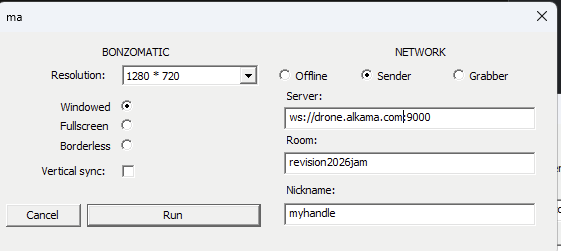
If you’re on MacOs or Linux, you need to update
config.jsonand update the serverUrl to:ws://drone.alkama.com:9000/revision2026jam/yourhandle
If you don’t see a Red Block next to your name on the bottom right of Bonzomatic main window, it means you’re OK. Otherwise there might be an issue.
Troubleshooting
Sometimes the DNS resolution isn’t working properly, instead of ws://drone.alkama.com:9000 you can use ws://37.187.21.171:9000 to avoid this issue.
For more help on joining please ping totetmattor psenough on discord.